Where
Where filters data in the database before it is returned to SearchKit. To filter data after it is returned from the database, use Having.
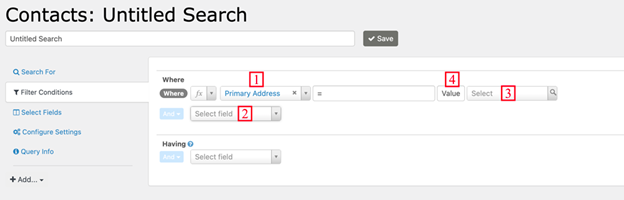
Description
A Where comparison has four main components:
- The element you want to compare.
- The “operator.”
- The value (or field) to compare against.
- Whether to compare with a value or a field.
In general, the operators are the same as the similarly-named arithmetic or SQL operators.
- Matches Pattern matches a regular expression pattern.
- Is Like matches a complete field, so you usually want to use it with wildcards to find parts of the field, like %search term%.
- Contains is useful for searching in serialized fields (fields that store multiple values together, such as Contact Subtype, which could be Parent, Volunteer, Staff). It matches only a full value like Parent, not parts of a value.
- Negated operators such as Not Like, ≠, or Doesn't Contain won't match NULL fields that have no value. They only match fields that have a value and the value doesn't match the criteria. If you want NULL fields as well, you can search for ≠ searchterm OR Is Empty.
This example only includes contacts whose email address contains ‘.gov’:

This example includes contacts whose primary address is not the same as their billing address:
